MD5 Authentication
BGP (Border Gateway Protocol) IPv6 MD5 Authentication is a security mechanism designed to protect the integrity and authenticity of BGP routing updates in IPv6 networks. It involves the use of MD5 cryptographic hashing to generate a checksum, or hash, for BGP messages exchanged between routers. By configuring MD5 authentication keys on participating routers, administrators can ensure that only trusted routers with matching keys can exchange BGP updates. This adds a layer of security against unauthorized or malicious attempts to manipulate routing information. BGP IPv6 MD5 Authentication is an essential practice for safeguarding the stability and trustworthiness of BGP-based communication in IPv6 environments.
Lab:
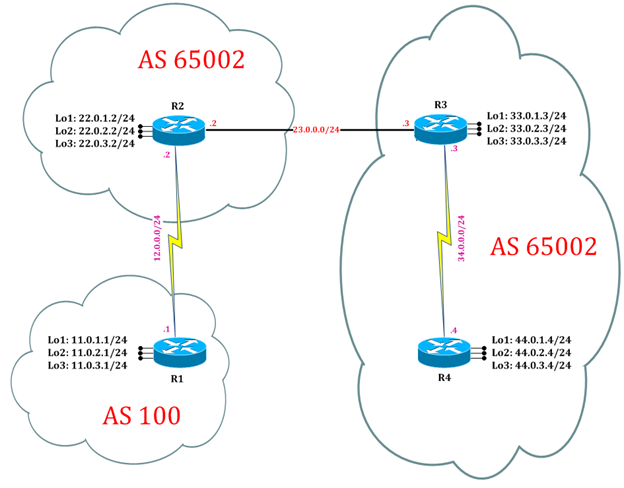
Task 1: Configure IPv6 BGP Process for Autonomous
Step 1: In the configuration mode of router configure IPv6 BGP Process by following command:
R1:
interface Serial2/0
ipv6 address 12::1/64
no shutdown
interface loopback 1
ipv6 address 11:11:11::11/64
exit

ipv6 route 22:22:22::22/64  12::2

ipv6 unicast-routing
router bgp 65000
bgp router-id 1.1.1.1
neighbor 22:22:22::22 remote-as 65000
neighbor 22:22:22::22 update-source loopback 1
address-family ipv6
neighbor 22:22:22::22 activate
exit

R2:
interface Serial2/0
ipv6 address 12::2/64
no shutdown
interface loopback 1
ipv6 address 22:22:22::22/64
exit
ipv6 route 11:11:11::11/64  12::1

ipv6 unicast-routing
router bgp 65000
bgp router-id 2.2.2.2
neighbor 11:11:11::11 remote-as 65000
neighbor 11:11:11::11 update-source loopback 1
address-family ipv6
neighbor 11:11:11::11 activate
exit
Task 2: Configure IPv6 BGP MD5 Authentication
Step 1: Configure IPv6 BGP MD5 Authentication by following command
R1:
router bgp 65000
neighbor 22:22:22::22 remote-as 65000
neighbor 22:22:22::22 password cisco
exit

clear bgp ipv6 unicast *
Step 2: Verify IPv6 BGP MD5 Authentication
R1:
R1# debug bgp ipv6
*Oct 26 03:36:57.250: %TCP-6-BADAUTH: No MD5 digest from 22:22:22::22(179) to 11:11:11::11(14249) tableid - 0
R1#
*Oct 26 03:36:59.252: %TCP-6-BADAUTH: No MD5 digest from 22:22:22::22(179) to 11:11:11::11(14249) tableid - 0
R1#
*Oct 26 03:37:06.205: %TCP-6-BADAUTH: No MD5 digest from 22:22:22::22(42104) to 11:11:11::11(179) tableid - 0
R1#
*Oct 26 03:37:08.205: %TCP-6-BADAUTH: No MD5 digest from 22:22:22::22(42104) to 11:11:11::11(179) tableid - 0
R1#
*Oct 26 03:37:11.257: %TCP-6-BADAUTH: No MD5 digest from 22:22:22::22(179) to 11:11:11::11(14249) tableid - 0
*Oct 26 03:37:11.261: %TCP-6-BADAUTH: No MD5 digest from 22:22:22::22(179) to 11:11:11::11(14249) tableid - 0
*Oct 26 03:37:12.205: %TCP-6-BADAUTH: No MD5 digest from 22:22:22::22(42104) to 11:11:11::11(179) tableid – 0
*Oct 26 03:38:15.329: %TCP-6-BADAUTH: No MD5 digest from 22:22:22::22(179) to 11:11:11::11(26195) tableid - 0

If a router has a password configured for a neighbor, but the neighbor router does not, a message such as this is displayed while the routers attempt to establish a BGP session between them:
%TCP−6−BADAUTH: No MD5 digest from [peer's IP address]:11003 to [local router's IP address]:179
Similarly, if the two routers have different passwords configured, a message such as this is displayed:
%TCP−6−BADAUTH: Invalid MD5 digest from [peer's IP address]:11004 to [local router's IP address]:179

R1#show bgp ipv6 unicast neighbors
BGP neighbor is 22:22:22::22,  remote AS 65000, internal link
BGP version 4, remote router ID 0.0.0.0
BGP state = Active
Neighbor sessions:
0 active, is not multisession capable (disabled)
Stateful switchover support enabled: NO for session 0
Step 3: Configure authentication on router R2.
R2:
router bgp 65000
neighbor 11:11:11::11 remote-as 65000
neighbor 11:11:11::11 password cisco
exit
Step 4: Verify IPv6 BGP MD5 Authentication.
R1:

*Oct 26 03:41:57.961: %BGP-5-ADJCHANGE: neighbor 22:22:22::22 Up

R1#show bgp ipv6 unicast neighbors
BGP neighbor is 22:22:22::22,  remote AS 65000, internal link
BGP version 4, remote router ID 2.2.2.2
BGP state = Established, up for 00:01:17
Last read 00:00:25, last write 00:00:18, hold time is 180, keepalive interval is 60 seconds
Neighbor sessions:
1 active, is not multisession capable (disabled)
Neighbor capabilities:
Route refresh: advertised and received(new)
Four-octets ASN Capability: advertised and received
Address family IPv6 Unicast: advertised and received
Enhanced Refresh Capability: advertised and received

R2:

*Oct 26 03:41:57.957: %BGP-5-ADJCHANGE: neighbor 11:11:11::11 Up

R2#show bgp ipv6 unicast neighbors
BGP neighbor is 11:11:11::11,  remote AS 65000, internal link
BGP version 4, remote router ID 1.1.1.1
BGP state = Established, up for 00:02:47
Last read 00:00:58, last write 00:00:56, hold time is 180, keepalive interval is 60 seconds
Neighbor sessions:
1 active, is not multisession capable (disabled)
Neighbor capabilities:
Route refresh: advertised and received(new)
Four-octets ASN Capability: advertised and received
Address family IPv6 Unicast: advertised and received
Enhanced Refresh Capability: advertised and received

R1:
R1#show bgp ipv6 unicast summary
BGP router identifier 1.1.1.1, local AS number 65000
BGP table version is 1, main routing table version 1

Neighbor        	V    AS 	     MsgRcvd  MsgSent   TblVer  InQ   OutQ   Up/Down    State/PfxRcd
22:22:22::22    	4    65000       7          7         1      0     0     00:03:29       0


R2:
R2#show bgp ipv6 unicast summary
BGP router identifier 2.2.2.2, local AS number 65000
BGP table version is 1, main routing table version 1

Neighbor          V      AS      MsgRcvd  MsgSent   TblVer   InQ   OutQ     Up/Down   State/PfxRcd
11:11:11::11      4     65000      8        8         1       0      0      00:03:57      0