Installing and Configuring Nagios
In Lab 8: Installing and Configuring Nagios, participants typically focus on the installation and initial configuration of Nagios, an open-source monitoring and alerting tool. This lab involves setting up the Nagios server, configuring essential parameters such as host definitions and service checks, and integrating plugins to monitor various aspects of the IT infrastructure. Participants may also explore the web interface for visualization and analysis of monitoring data. The lab aims to provide hands-on experience in deploying Nagios, enabling participants to establish a robust monitoring system for tracking the health and performance of network devices, servers, and services. Successful completion of Lab 8 equips participants with the skills to implement effective monitoring solutions using Nagios in their IT environments.
Lab:
Step 1: Disable SELinux
sed -i 's/SELINUX=enforcing/SELINUX=disabled/g' /etc/selinux/config
setenforce 0
sestatus
Step 2: Install required Packages
yum install https://dl.fedoraproject.org/pub/epel/epel-release-latest-8.noarch.rpm
yum install wget php gcc glibc-common gd gd-devel make net-snmp perl perl-devel openssl
Step 3: Download package
wget https://assets.nagios.com/downloads/nagioscore/releases/nagios-4.4.4.tar.gz
Step 4: Extract the package
tar -xvf nagios-4.4.4.tar.gz
Step 5: Create and user and Group
groupadd nagcmd
useradd -g nagcmd nagios
usermod -aG nagcmd apache
groupadd nagios
usermod -aG nagios nagios
id nagios
Step 6: Compile the package
cd nagios-4.4.4
./configure --with-command-group=nagcmd
make all
make install
make install-init
make install-commandmode
make install-config
make install-exfoliation
Step 7: Create nagiosadmin user and password for web console access. Enable and Start Services.
htpasswd -c /usr/local/nagios/etc/htpasswd.users nagiosadmin
systemctl status httpd
systemctl start httpd
systemctl enable httpd
systemctl start nagios
systemctl enable nagios
systemctl status httpd
systemctl status nagios
Step 8: Download and install Nagios plugins
cd /tmp
wget https://nagios-plugins.org/download/nagios-plugins-2.3.3.tar.gz
tar -xvf nagios-plugins-2.3.3.tar.gz
cd nagios-plugins-2.3.3
./configure –with-nagios-user=nagios –with-nagios-group=nagios
make
make install
cd /usr/local/nagios/libexec/
ls
cd /root/nagios-4.4.4
ls
make install-webconf
systemctl restart httpd
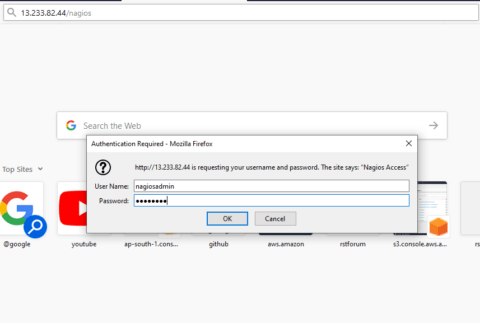
Step 9: Login to Web Console
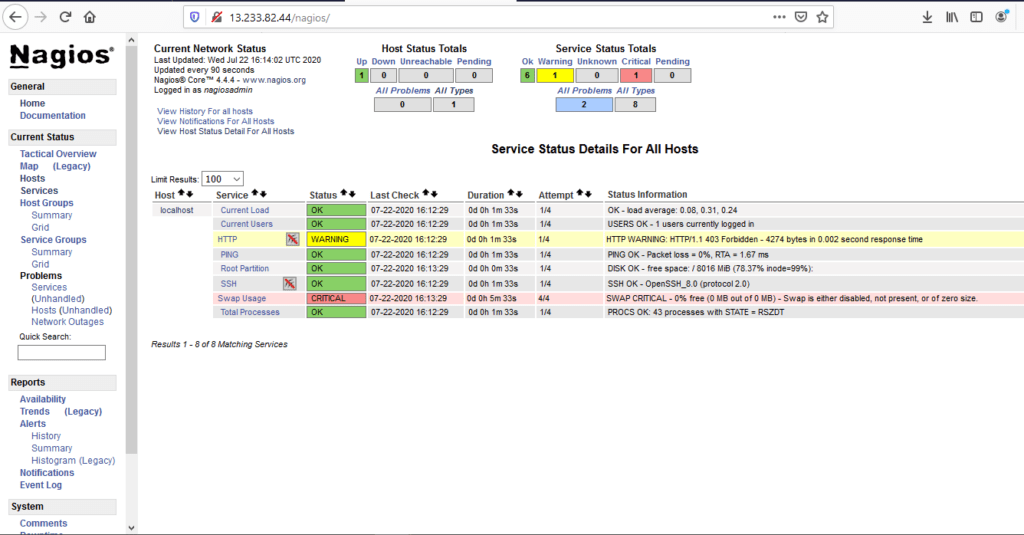
Step 10: After successful installation of plugins, you can see all services checks completes normally