Get User Input
Python has a built-in function called input that will prompt the user and give us back the result, which can be stored into a variable.
print("Please enter your full name")
name = input()

name = input("Please enter your full name: ")
Conditional Statements
Conditional logic using if statements represent different paths a program can take based on some type of comparison of input.
if name == "Mark Zuckerberg":
  print("You work at Facebook")
elif name == "Jack Dorsey":
  print("You work at Twitter")
elif name == "Sundar Pichai":
  print("You work at Google")
else:
  print("Not enough data")
Truthy & Falsy
All conditional checks resolve to either True or False
x = 1
x is 1  # True
x is 0  # False
We can call values that resolve to True as “truthy”, and values that resolve to False as “falsy”. Besides False, other things that are naturally falsy include: empty objects, empty strings, None and zero (0).
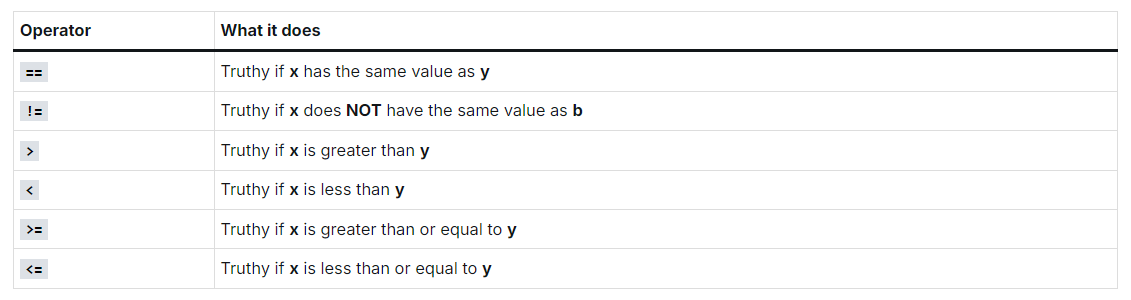
Comparison Operators
Consider we are comparing two variables, x and y. Ex. x > y
Logical Operators
The following operators can be used to make Boolean Logic comparisons or statements:

is vs. “==”
In Python, == and is are very similar in functionality, but they are not the same.
x = 1
x == 1  # True
x is 1  # True

x = \[1, 2, 3\]   # A list of numbers.
y = \[1, 2, 3\]
x == y  # True
x is y    # False

z = y
y is z    # True
Nested Conditionals
if statement inside an if statement
Scratchpad file
Show file detail
# = assignment
# == compare

# name = input("Please enter your name: ")

# if name != "Mark Zuckerberg":
#     print("You don't belong to Facebook")
# elif name == "Jack Dorsey":
#     print("You don't belong to Twitter")
# elif name == "Sundar Pichai":
#     print("You don't belong to Google")
# else:
#     print("Whatever!")

# Operators
# == equal to
# != not equal to
# > great than
# < less than
# >= greater than or equal to
# <= less than or equal to

# age = input("Please enter your age: ")
# age = int(age)

# if age >= 21:
#     print("You are allowed to drink")
# elif age >= 65:
#     print("You get drinks for free")
# else:
#     print("Sorry you can't drink!")

# if items > 20:
#     print("Oh, you have a lot of stuff")
# elif items < 10:
#     print("Too bad, you can buy more.")
# else:
#     print("That's perfect")

# Truthiness
# Falsyness

# logged\_in = "someuser@gmail.com"

# if logged\_in:
#     print("You have logged in, see the content")
# else:
#     print("Sorry, please login to check")

# Logical Operations
# and
# or
# not

# age = input("Please enter your age: ")
# age = int(age)

# if age >= 21 and age < 65:
#     print("You are allowed to drink")
# elif age >= 65:
#     print("You get drinks for free")
# elif age >= 18 and age < 21:
#     print("You can enter but you cannot drink")
# else:
#     print("Sorry you can't drink, you're too young!")

# NAME
# city = "mumbai"

# if city == "mumbai" or city == "bangalore":
#     print("You live in a tier 1 city")

# if city == "pune" or city == "jaipur":
#     print("You live in a tier 2 city")

# if not city == "mumbai":
#     print("You are out of Mumbai")

# and -> LHS and RHS  TRUE
# 0, None, "" -> Falsy values
#

# username = "mark@fb.com"

# if not username:
#     print("Hello my friend")
# else:
#     print("You are not welcome")


# is vs ==
# == - it checks for the value.
# is - checks whether it is the same thing in memory


# Nested conditionals

age = input("How old are you? ")

if age:
    age = int(age)
    if age >= 21 and age < 65:
        print("You are allowed to drink")
    elif age >= 65:
        print("You get drinks for free")
    elif age >= 18 and age < 21:
        print("You can enter but you cannot drink")
    else:
        print("Sorry you can't drink, you're too young!")
else:
    print("Please enter a valid age!")
Scratchpad file – loops
# For loop

# numbers = \[100, 20, 2, 24, 45\]

# for number in numbers:
#     num = (number / 2) \* 2.3
#     print(f"The value of this number is {num}")


# name = "Stephen"

# for char in name:
#     print(char)

# Iterable - range of numbers, strings, lists, dictionaries
# my\_time = 4

# for time in \[1, 2, 3, 4\]:
#     print("Happy Birthday!")
#     my\_time = time


# print(my\_time)
# for item in iterable\_object:
#     do something

# for num in 10:
#     print("Hello World")

# range(20) -> 0
# range(10, 21) ->
# range(0, 21, 2)
# range(10, 1, -1)
# range(start = 0, end, step = 1)

# for time in range(0, 6):
#     print("JUMP")

# rant = input("How many times do you want to scream? ")
# rant = int(rant)

# for i in range(0, -50, -1):
#     print("CLEAN YOUR ROOM!!!!")

#     if i == 5:
#         print("OKAY OKAY, I'll do it!")

# 1 - 20 ->
# odd - "Fizz is odd"
# even - "Fizz is even"
# 5, 16, print("FizzBuzz")

# num % 2 != 0 (odd)

# for num in range(1, 21):
#     if num == 5 or num == 16:
#         print(f"{num}: FizzBuzz")
#     elif num % 2 == 0:
#         print(f"{num}: Fizz is even")
#     elif num % 2 != 0:
#         print(f"{num}: Fizz is odd")

# While loop

# password = input("Please enter your secret password: ")

# while password != "tesla1":
#     print("INCORRECT PASSWORD! GET LOST!")
#     password = input("Please enter the correct password: ")

# print("CORRECT! Hello...")


# num = 10

# i = 1
# while i <= num:
#     print(f"{i}: Hello World")
#     i = i + 1

# break statement

# password = input("Please enter your secret password: ")

# while password != "tesla1":
#     if password == "GODMODE":
#         break

#     print("INCORRECT PASSWORD! GET LOST!")
#     password = input("Please enter the correct password: ")

# print("CORRECT! Hello...")


# num = 30

# i = 1
# j = 1
# while i <= num:
#     if i == 10:
#         while j < 5:
#             print("Hello world!")
#             j += 1

#     print(f"{i}: Hello World")
#     i = i + 1


# Exercise 1
# 0 : 20
# 0 : -30
# 30 : -30


# Exercise 2: Rock paper scissor
# best out of three

# player1\_wins = 3
# player2\_wins = 0
# winning\_score = 3


# while player1\_wins >= 3 or player2\_wins >= 3:
#     print("Player1 wins")
#     player1\_wins += 1

#     # code...............

# if player1\_wins > player2\_wins:
#     print("PLAYER 1 is the victor!")
# else:
#     print("PLAYER 2 is the vector!")


# Data Structures -> Data Types
# int, strings, None, List, Dicts

# data structure
# list = \[1, "hello", 3, 4, True, None, \[1, 2, 3, 4\], \[1, 2, 3, 5.5555\]\]

# shopping\_cart = \["apples", "cucumbers", "phone"\]


# results = \[
#     \["One", "Metallica", 3.49, 1000000, "Song performed by metallica from the album, St. Anger",
#      "bucket3.aws.amazonaws.com/photo-gal/11134/32/thumbnail\_32.png"\]
#     \["Fade to black", "Metallica", 3.49, 1000000, "Song performed by metallica from the album, St. Anger",
#      "bucket3.aws.amazonaws.com/photo-gal/11134/32/thumbnail\_32.png"\]
#     \["Fade to black", "Metallica", 3.49, 1000000, "Song performed by metallica from the album, St. Anger",
#      "bucket3.aws.amazonaws.com/photo-gal/11134/32/thumbnail\_32.png"\]
# \]