Abstract Window Toolkit (AWT)
The Abstract Window Toolkit supports Graphical User Interface (GUI) programming. AWT features include:
- A set of native user interface components
- A robust event-handling model
- Graphics and imaging tools, including shape, color, and font classes
- Layout managers, for flexible window layouts that do not depend on a particular window size or screen resolution
- Data transfer classes, for cut-and-paste through the native platform clipboard
Java AWT (Abstract Window Toolkit) is an API to develop GUI or window-based applications in java. AWT is heavyweight i.e. its components are using the resources of OS. The java.awt package provides classes and interfaces for AWT API such as TextField, Label, TextArea, RadioButton, CheckBox, Choice, List, Event handling, etc…
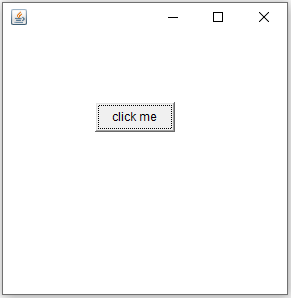
Case 0: we are inheriting Frame class. Here, we are showing Button component on the Frame.
// save as First.java
import java.awt.\*;

class First extends Frame {
    First() { // constructer
        Button b = new Button("click me");
        b.setBounds(100, 100, 80, 30); // setting button position
        add(b); // adding button into frame
        setSize(300, 300); // frame size 300 width and 300 height
        setLayout(null); // no layout manager
        setVisible(true); // now frame will be visible, by default not visible
    }

    public static void main(String args\[\]) {
        First f = new First();
    }
}
/\*
Output:
             Javac First.java
             Java First

\*/